
Showing unit availability in an orbital 3D model
What buyers see of available units in an orbital 3D model, where the display is useful, how to keep it up to date and what it does not replace.
By David Dana
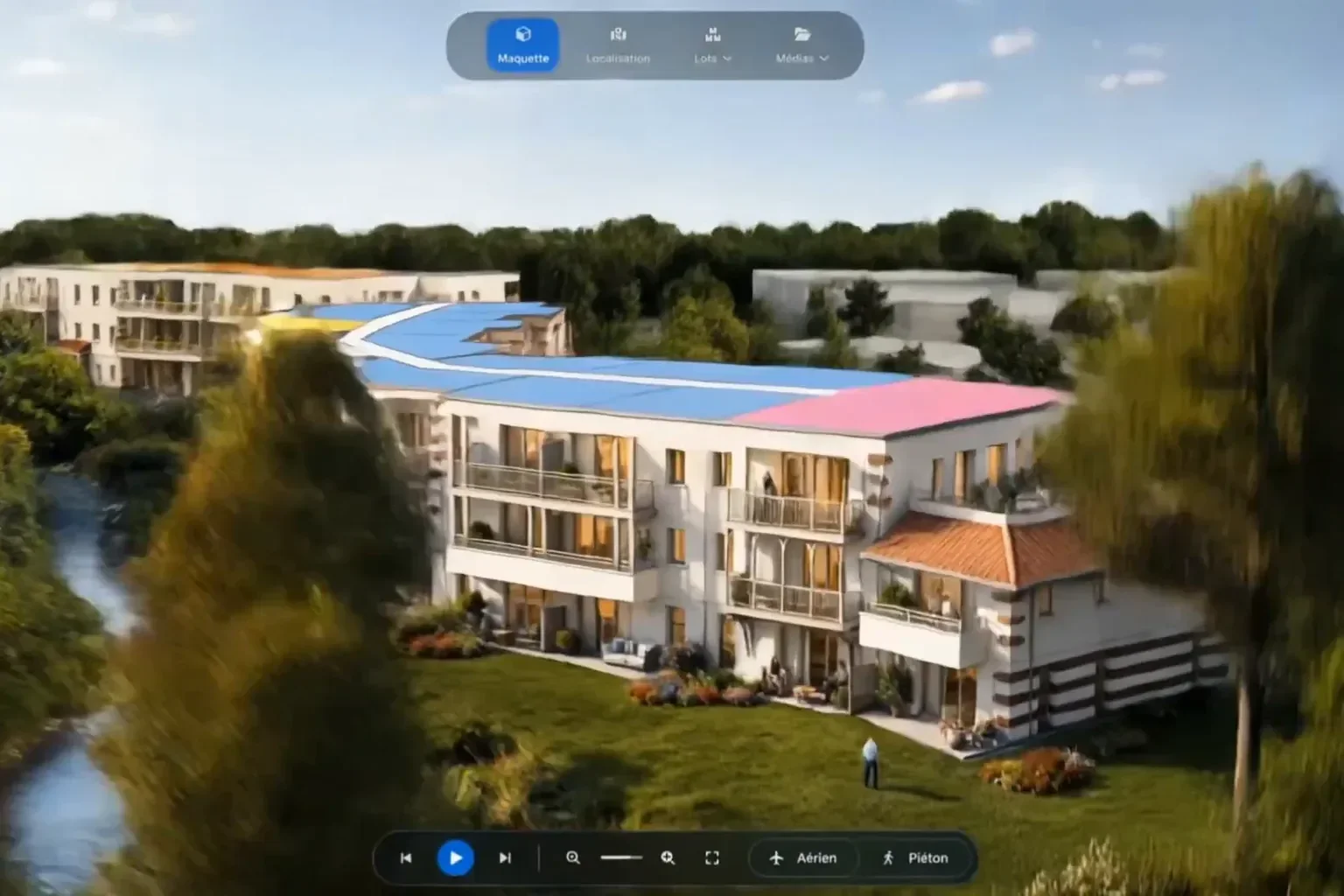
In short: showing unit availability in an orbital 3D model means displaying, on the 3D model of the development, which homes are still for sale, in their actual place in the building. Buyers filter the units by the criteria the developer has chosen, find those that suit them and see whether they are still available. The display can be linked to the developer's CRM so that it stays up to date throughout the sales period. It informs, but it is neither a reservation nor a commitment: the reservation contract and its appendices are what count.
In a new development, a buyer who has made up their mind rarely asks "what does the scheme look like?" first. They ask "what is left?". A unit list or a price schedule answers that, but without showing where each home is. The orbital model answers it in three dimensions: the available unit appears where it will be built, with its floor, its orientation and its neighbours.
This article explains what buyers see on screen, where the display is useful, how to keep it up to date and what it does not replace. If you are new to the tool, start with our introduction to orbital 3D models for property development.
Unit availability: what are we talking about?
Within an orbital model, the availability display shows, unit by unit, on the 3D model of the development, whether a home is still on sale. Filters let the user keep on screen only the units that meet their criteria. The two functions go together: you filter to narrow the choice, and you immediately see what is still available within it.
Two related subjects are covered elsewhere. The floor-by-floor cutaway isolates one level to show where a home sits in the building; the availability display is layered on top of it. Here, the focus is on what the public sees.
What buyers see on screen
The unit in its place in the building
Buyers do not read a spreadsheet row: they see a home in a building. By choosing a floor, they bring up the units on that level, and the display shows which ones are still available. At the same time, they grasp what a schedule leaves out: corner or mid-facade, facing the street or the garden, low or high up.
Filters chosen for the development
Filter criteria are set with the developer, according to what matters for the scheme: unit type or floor, for example. A buyer looking for a two-bedroom flat on an upper floor does not have to scan the whole building: they narrow the display to the homes that suit them, then check which ones are available. A few criteria that everyone understands work better than a long list nobody uses.
Information that does not rely on colour alone
Availability is often shown with colours. To keep it understandable for everyone, including people who have difficulty telling some colours apart, colour should not be the only cue. The Web Content Accessibility Guidelines put it this way: "Color is not used as the only visual means of conveying information" (WCAG 2.2, success criterion 1.4.1, consulted on 19 November 2026). Whatever the tool, it is therefore good practice to plan a visible legend and a text label for each status from the scoping stage, rather than relying on colours alone.
From the unit to its floor plan
Once the unit has been found, the buyer wants to know its layout. That is the role of the 3D floor plan: it shows the rooms, the furniture and the outdoor space of the home. The model says "where" and "is it available?", the plan says "how". Our article on 3D floor plans for new builds explains what this medium adds.
Where the availability display is useful
On the development website
The model opens in a web browser, on a computer, tablet or phone. A buyer can therefore check, before any contact, that a suitable home is still available. They arrive at the first appointment with a clear idea, and the sales adviser starts from their shortlist rather than the whole schedule.
In appointments and in the sales suite
The adviser uses the same screen to compare two available units of the same type, on two different floors or with two different orientations. The buyer sees why one interests them more than the other, without a pile of printed plans.
Down to the last units
Towards the end of the sales period, few homes are left, often scattered across the scheme. Showing them in place helps present them for what they are, a floor, a view, an outdoor space, rather than as the last lines of a list. Our article on 3D visualisation across a project's stages shows where this need arises.
Keeping the display up to date
An availability display is only worth something if it is accurate. A unit shown as available when it has just been reserved causes disappointment, and sometimes a loss of trust. There are two options:
- manual updates: someone changes the status at each reservation; it is simple, but everything depends on how regularly it is done;
- a link with the developer's CRM: availability can be connected to the CRM so that the model stays up to date throughout the sales period. The displayed status then follows the one the sales team already records, with no re-keying.
Either way, the data source, the person responsible and the update method are agreed before going live, and the condition is the same: a single source for unit status, and the same numbering in the sales schedule, the plans and the model.
What the display does not replace
The availability display is an information tool. It does not reserve a unit, set a price or describe the home in contractual terms. In France, the national housing information agency (ANIL) notes that "advertising documents have no contractual value" (« les documents publicitaires n'ont aucune valeur contractuelle »); buyers must refer to the description appended to the reservation contract (ANIL, buying off-plan, in French, consulted on 19 November 2026). Which document prevails is covered in the VEFA descriptive notice and 3D renderings.
Should prices be shown? That is the developer's decision, depending on their sales policy and how often they update. The model can stick to availability and leave the price schedule to the sales adviser.

Decisions to make before going live
The display is set at the scoping stage, with a few simple decisions:
- the filter criteria offered to the public, kept to a small number;
- what is shown for each unit: available or not, and under which label;
- what is not shown: units not on sale, commercial premises, parking spaces, depending on the scheme;
- who updates it, and how: manually or through the CRM link;
- the initial unit schedule, with the same numbering as the sales plans.
The quote then defines the scope: which buildings, floors and units are covered. We can work from your architect's plans or from an existing 3D model.
Showing what is left, where it is
Within an orbital model, the availability display turns a list into a picture: buyers see what is left, where, and on which floor. It is only fully useful if it is kept up to date, readable by everyone, and clearly points to the documents that are binding.
At VIZION STUDIO, every orbital model is produced on computer from your plans. It brings together the floor-by-floor cutaway, unit filters and availability, sunlight simulation and, if you wish, a connection to your CRM. Explore our orbital 3D model service or get in touch with your development's unit schedule: we will suggest the filters and display that fit it.
3D services to bring your project to life
Preparing a property launch or an architectural presentation? Explore deliverables and examples relevant to this topic.
Frequently asked questions about unit availability in an orbital 3D model
How can availability be made readable for everyone?
By not relying on colour alone: a visible legend and a label for each status are planned at the scoping stage, as WCAG 2.2 (criterion 1.4.1) requires. The same wording is then used in the sales schedule, the plans and the model.
What can buyers filter in the model?
The criteria are set with the developer for each scheme, for example unit type or floor. Buyers narrow the display to the homes that suit them, then see which ones are available.
How does the availability display stay up to date?
Either through a manual update at each reservation, or through a link with the developer's CRM: the displayed status then follows the one the sales team records. Either way, a single source is the reference for unit status.
Is the developer bound by the availability display?
No. It is sales information, neither a reservation nor a price offer. In France, advertising documents have no contractual value: the reservation contract and the description appended to it are what count.
Should prices be shown in the orbital model?
That is the developer's decision, depending on their sales policy and how often they update. The model can stick to availability and leave the price schedule to the sales adviser.
Give your project the images that will sell it
Tailor-made quote, no commitment.